Sora by OpenAI
- 4.6
- Rating
- 1.00M
- Installs
- Free
- Price

 Analysis by App-foxy
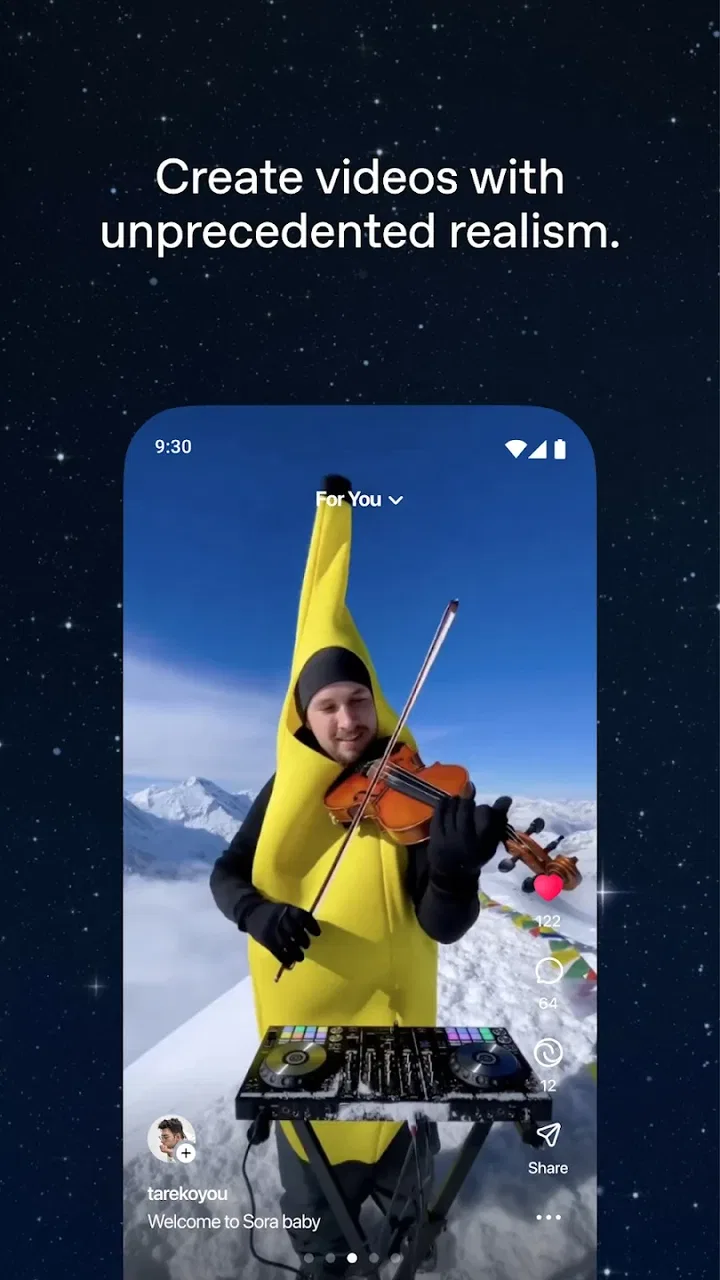
Sora is the kind of social app that makes you rethink what a short video can be. Instead of recording a clip first and editing it afterward, I can begin with an idea and explore how OpenAI’s video-generation tool interprets it. That makes the experience feel closer to directing a tiny scene than posting a conventional phone video.
I reviewed it as a free app from OpenAI, aimed at a Teen audience and available on Android from version 7.0 onward. Its position in the social category is unusual: the central activity is not simply chatting, following people, or uploading camera footage. It is creating and sharing AI-generated video. That difference is exactly why I found it interesting, but it also means Sora is not a replacement for every familiar social network.
How Sora feels in a normal creative workflow
The most useful way to approach Sora is to treat each prompt as a direction for a visual experiment. I get better results when I describe the subject, setting, movement, lighting, and overall mood rather than writing a vague sentence and hoping the app fills in every important detail. A prompt such as “a quiet street at night” leaves too much open. Adding the camera viewpoint, the pace of movement, the weather, and the atmosphere gives the generation a clearer starting point.
You May Also Like

 Blood Strike: 2.5 Anniversary
Blood Strike’s Loadouts Turn Every Drop Into a Tactical Gamble
A close look at Blood Strike’s custom loadouts: how fast access to signature weapons reshapes its battle royale rhythm, rewards preparation, and narrows the gap between fights.

 Pandora - Music & Podcasts
Pandora’s Music Is Easy to Start, but Harder to Recover
Pandora’s strength is its low-effort path from a seed to a station. Its weak spot is how much confidence it asks you to place in connection, setup, and quiet recovery.

 8 Ball Pool
 Is Built on Rivalries, Rematches, and Routine
A close look at the rivalries, rematches, shared routines, and unanswered safety questions that turn a quick pool match into a persistent mobile community.

 Samsung Music
’s Quiet Strength Is Playing What You Already Own
Its reach comes less from spectacle than from dependable access to a personal library. That simplicity is both the app’s strongest retention engine and its ceiling.

 AccuWeather: Weather Radar
AccuWeather Review: A Quick, Clear Forecast for Everyday Decisions
For everyday plans, the best forecast is the one you can understand quickly. AccuWeather makes rain timing, radar, and local conditions easy to act on, with a few trade-offs.

 Hill Climb Racing
Why Hill Climb Racing Still Turns Crashes Into One More Run
A tiny car, a bumpy hill and one more upgrade: Hill Climb Racing keeps resurfacing because its simple chaos makes every near-miss feel personal.
More From Our News Desk
View All News


My baseline workflow is deliberately simple. I first decide what the video is meant to communicate: a mood, a visual joke, a miniature story, or an idea for a larger project. Then I write one focused description instead of combining several unrelated scenes. After viewing the result, I change one or two elements at a time. This makes it easier to understand whether a different subject, camera instruction, or setting actually improved the result.
That last step matters more than it sounds. When I rewrite the entire prompt after every attempt, I cannot tell which wording helped. Sora becomes more useful when I treat generations as a sequence of small tests. I keep the successful parts of a description and replace only the weak part. This repeatable habit is more valuable than trying to discover a magical all-purpose prompt.
For an everyday example, imagine that I want a short visual to accompany an invitation to a movie night. I might begin with a cozy living room, a glowing screen, snacks on a table, and rain beyond the window. If the result feels too busy, I remove extra objects rather than adding more instructions. If the mood is right but the movement is distracting, I ask for a calmer camera and fewer actions. The app works best when I make creative decisions before generation instead of expecting it to edit my idea for me.
Sharing is another reason to use it as a social app rather than a private image-making utility. A generated clip can become a conversation starter, a playful post, or a way to show friends an idea that would be difficult to film. Still, I would not use it for situations where a real recording is essential. A generated scene is an interpretation, not evidence of an event, and that distinction should remain clear whenever a video could be mistaken for documentary footage.
Who gets the most from the basic experience
I think Sora is especially appealing to people who enjoy visual brainstorming but do not want to learn a full editing suite. Writers can use it to explore the tone of a scene. Designers can test a mood before committing to a storyboard. Social creators can develop unusual concepts without arranging a location, actors, or equipment. Even a casual user can make a more expressive message than a plain text post when the idea is easier to show than explain.
It is less convincing for someone who mainly wants to preserve real memories, edit family recordings, or create a polished video from personal footage. A traditional camera app and a familiar editor are better choices for those jobs because they begin with authentic material and give direct control over cuts, audio, and timing. Sora’s strength is imaginative generation, not ordinary video organization.
Settings and prompt choices that are worth checking
The first setting I pay attention to is the shape and purpose of the output. A vertical concept makes more sense for a phone-first social post, while a wider composition may suit a scene intended for a larger screen. I also think about where the main subject will sit. Leaving the important action near the center can make a clip easier to view on a small display, while a deliberately off-center composition can create a more cinematic feeling.
I do not treat visual style as a substitute for scene direction. Words such as “cinematic” or “realistic” can influence the atmosphere, but they do not explain what should happen. I get more predictable results when style comes after the practical instructions: who or what is present, where it is, what moves, and how the viewpoint behaves. This is one of the easiest ways to avoid a beautiful-looking clip that has no clear subject.
Another useful adjustment is the amount of action requested. A crowded prompt with several characters, fast movement, changing locations, and multiple objects gives the system too many relationships to interpret at once. I prefer one principal action and one supporting action. For example, a cyclist moving through fog is easier to direct than a cyclist, a dog, a passing train, fireworks, and a sudden change from day to night in the same short idea.
The most practical setting is often restraint. Removing unnecessary instructions can improve coherence more than adding elaborate adjectives. When a result has strange motion or confused objects, I simplify the scene first. This is a useful trade-off: a simpler clip may be less ambitious, but it is often more usable and easier to share.
I also check the result for details that are easy to overlook during the first viewing. I look at hands, faces, text inside the scene, object relationships, and the continuity of movement. These areas can affect whether a video feels convincing. If a clip includes a sign, label, or message, I would not assume the generated lettering is dependable without inspecting it closely. For a social post, that may be a minor annoyance; for an announcement or instructional video, it can become a serious problem.
Because Sora is free to install and use, it is easy to start experimenting without a large financial commitment. The app does include in-app purchases priced at four dollars per item, so I would pay attention before confirming anything beyond the basic experience. I would not spend money simply to chase a disappointing generation. First I would simplify the prompt, clarify the action, and decide whether the concept itself is suitable for AI video.
The app carries an average rating of 4.6 from around 80 thousand ratings, which suggests that many users are finding value in the concept. I see that as encouraging rather than conclusive. AI video tools can be exciting when a generation lands well, but the experience is naturally uneven because the result depends on the wording and complexity of each request. A strong rating does not remove the need for patience.
Small habits that make the process faster
My fastest pattern is to keep a small collection of reusable prompt structures, not finished prompts. One structure describes the subject and location, another describes movement and camera behavior, and a third sets the mood. I fill in those parts for each new idea. This is quicker than starting from a blank screen, while still leaving enough room for the video to feel original.
I also separate “must have” details from “nice to have” details. The must-have list might contain a red umbrella, a quiet train platform, and a slow forward camera movement. The nice-to-have list might mention reflections, mist, and a particular color palette. If the result struggles, I remove the optional details first. This protects the central idea instead of sacrificing it to visual decoration.
For repeat projects, I would use a naming habit outside the creative moment: record the core prompt, the change made, and what improved. Even a short note can prevent me from repeating the same failed experiment. This is especially helpful when I am developing several variations for a social post and want to compare them fairly rather than choosing the newest result automatically.
Another efficient approach is to design the opening image before worrying about elaborate motion. A clip with a clear first moment is easier to judge and easier for viewers to understand. Once the opening works, I can add movement carefully. If the first frame already contains too many competing elements, extra motion usually makes the problem harder to fix.
I would also avoid generating a long chain of unrelated ideas in one session. Sora feels more manageable when I group work by purpose: atmospheric backgrounds, playful character concepts, product mood boards, or personal messages. Grouping helps me recognize patterns in what works and keeps the social feed from becoming a random collection of experiments.
Where the creative control reaches its limits
The biggest limitation is that generation is not the same as precise animation. I can describe an intended action, but I should not expect the same frame-by-frame control I would get from a conventional editor or animation tool. If a project depends on exact timing, accurate typography, consistent branding, or a particular person’s appearance, I would choose a more controlled workflow or use Sora only during the concept stage.
Consistency across multiple clips is another challenge. A character, object, or location may not remain perfectly identical when I create separate generations. That makes Sora well suited to standalone moments and visual sketches, but less suitable for a series that demands strict continuity unless I am prepared to review and refine every result carefully.
There is also a difference between visual plausibility and factual reliability. A clip can look polished while still showing an impossible action or an incorrect detail. I would never use an AI-generated scene as a substitute for a real demonstration, a news record, or proof that something happened. For creative storytelling, the imaginative freedom is a benefit. For factual communication, it becomes a responsibility.
Speed is not the only measure of usefulness. Sora can remove some production barriers, but it introduces a selection problem: I may spend time comparing several imperfect interpretations before finding one that fits. Someone who already knows exactly what they want may move faster with filmed footage and a traditional editor. Someone who has a rough idea but no practical way to stage it may find the trade-off worthwhile.
The social side also needs thoughtful use. I would label generated material clearly when context could confuse viewers, especially if the scene resembles a real event or person. I would avoid using the tool to create misleading posts, impersonation, or fabricated evidence. The ability to make a convincing-looking clip is useful precisely because it deserves careful judgment.
Sora is rated Teen, which matches the need for users to think about context, realism, and responsible sharing. Parents deciding whether it suits a younger user should consider not only the creative features but also the social environment around generated media. The app is not just a drawing toy; it can produce moving scenes that other people may interpret quickly and emotionally.
The current version is 1.2025.351, and the app has passed one million installs. That gives it a substantial early audience, but popularity does not change my practical advice: start with a small, low-stakes project. Make a mood clip, a fictional setting, or a playful visual message before attempting work that carries reputational, commercial, or factual consequences.
When another app is the better choice
If I want to edit footage from my phone, I would choose a normal video editor. If I want a live conversation, I would use a messaging or social platform built around people rather than generated scenes. If I need detailed control over sound, cuts, captions, color, and timing, a dedicated production tool is the better fit. Sora earns its place when the starting point is an imagined scene that would be difficult, expensive, or impossible to record.
That distinction also answers an important practical question: is Sora useful without advanced creative skills? Yes, but the quality of the result improves when I can describe visual cause and effect. I do not need professional filmmaking language, yet I do need to say what should be visible and what should move. Beginners should start with one subject, one setting, and one action rather than copying complicated prompt formulas.
Another likely question is whether paying for individual items is necessary. My answer is no for initial evaluation. I would first learn the basic workflow, identify the kinds of scenes that suit the app, and decide whether the results are valuable for my own needs. A purchase makes more sense only when a specific generation has a clear purpose and the cost fits that purpose, not merely because an experiment was almost successful.
Users may also wonder whether Sora is good for professional work. I would describe it as a strong ideation and concept tool, with possible value in social content, mood boards, and early visual development. I would be cautious about treating it as the only production tool for client work. Professional use requires consistent outputs, dependable text, clear rights and permissions for the material involved, and a review process that catches visual errors.
My verdict after building a repeatable habit
I recommend Sora to curious creators who want to turn written ideas into short visual experiments and share those experiments socially. Its best moments come when I give it a focused concept, keep the action manageable, and judge each result with a critical eye. The app makes visual exploration feel approachable, especially for people who have ideas but lack a camera crew, location, or editing experience.
I would not recommend it as a universal replacement for filming, editing, or ordinary social networking. The generated result can require patience, and precise continuity or factual accuracy may demand a different tool. The free entry point is appealing, while the four-dollar in-app items mean I would still make deliberate choices before spending.
After more than a few casual tests, my strongest advice is to build a habit around clarity: define the purpose, describe one main action, inspect the troublesome details, and change only what needs changing. That approach produces more useful results than chasing elaborate wording. Sora is most rewarding when I use it as a visual thinking partner, not as an automatic substitute for creative judgment.
For me, that makes it a compelling social app with a clear personality. It is playful, experimental, and capable of opening ideas that ordinary camera apps cannot reach. It is also imperfect in exactly the way generative tools are imperfect: the distance between an exciting concept and a dependable final clip still requires human review. If you are comfortable with that trade-off, Sora is worth trying; if you need certainty and exact control from the first attempt, a conventional video workflow will serve you better.
FAQs for Sora by OpenAI
01What is Sora by OpenAI?
Sora by OpenAI is an innovative application designed to enhance productivity and creativity through AI-powered tools. It offers features such as advanced text generation, language translation, and content summarization. The app is suitable for writers, students, and professionals looking to streamline their workflow with cutting-edge AI technology.
02How does Sora ensure user data privacy?
Sora by OpenAI prioritizes user privacy by implementing robust data encryption and secure server protocols. The app does not store personal data, and any information processed is anonymized. Users can trust that their interactions with the app remain confidential and secure, aligning with industry standards for data protection.
03Is Sora available on both Android and iOS?
Yes, Sora by OpenAI is available for download on both Android and iOS platforms. The app is optimized for seamless performance across devices, ensuring that users can access its features regardless of their operating system. Check the respective app stores for compatibility with your device version.
04What are the main features of Sora?
Sora offers a range of features designed to boost productivity, including AI-driven text composition, language translation, and document summarization. The app also provides a user-friendly interface with customizable settings, allowing users to tailor the experience to their specific needs. Regular updates ensure new features and improvements are consistently added.
05Does Sora require an internet connection to function?
Sora by OpenAI requires an internet connection to access its full range of AI services, as it leverages cloud-based processing for complex tasks. However, some basic functions may be available offline. Users should ensure a stable internet connection to fully utilize all features and receive real-time updates.
Pros
- Intuitive interface for easy navigation.
- High-quality AI-generated voiceovers.
- Customizable reading speed options.
- Offline mode for uninterrupted usage.
- Seamless integration with e-libraries.
Cons
- Limited language support currently.
- Requires stable internet for updates.
- Subscription needed for premium features.
- Occasional bugs with text formatting.
- Not compatible with older devices.

Sora by OpenAI
Gallery